A Practical Guide to Jira Work Item Fields & Layouts
(For New and Existing Users)
Why this guide exists
As our Jira usage grows, it’s important that every issue clearly communicates why the work exists, not just what is being built. This guide explains:
What the original requirement was
What has been implemented
How to correctly use Jira fields going forward
How to think about fields, screens, and layouts in simple terms
This is written for new users and non-admin users as well.
1. Original Requirement (What was requested)
The request was to introduce a structured way to capture the intended business value of each Jira issue.
Requirement Summary
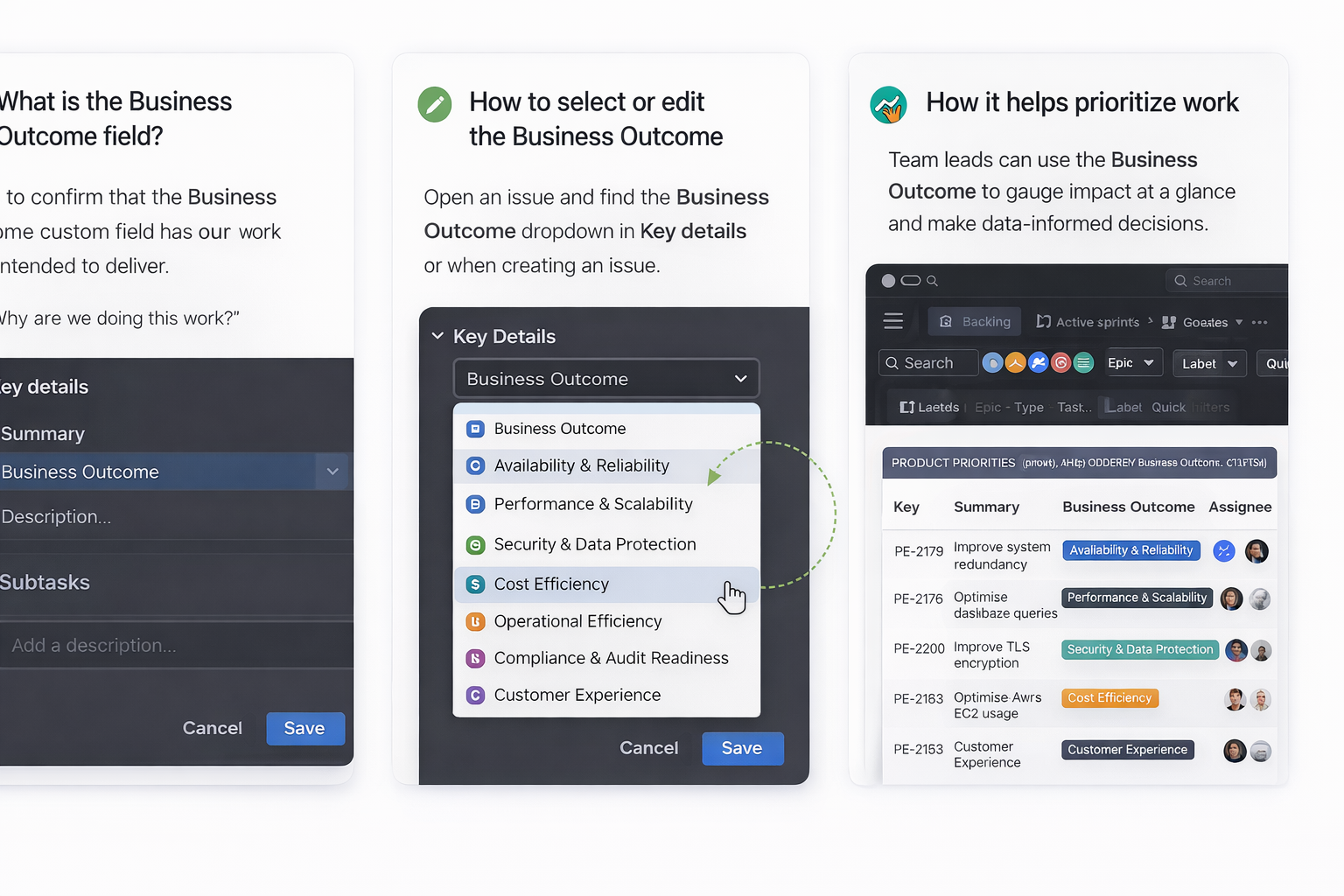
A new custom field called Business Outcome was requested with:
Field type: Dropdown (Single Select)
Values:
Availability & Reliability
Performance & Scalability
Security & Data Protection
Cost Efficiency
Operational Efficiency
Compliance & Audit Readiness
Customer Experience
Applicability
Available across all major issue types:
Epics
Stories
Tasks
Bugs
Purpose
Improve prioritization
Enable consistent reporting
Support AWS Well-Architected Framework Reviews (WAFR)
Ensure engineering work aligns with business and architectural goals
2. What Has Been Implemented (What we did)
The following changes are now live:
✅ Custom Field Created
Business Outcome dropdown field created
Configured with agreed values
✅ Field Applied to Project
Field applied to the Product Engineering project
Available on the default issue screen
✅ Field Added to Issue Layout
Field placed prominently in the Key Details / Description section
Visible on:
Existing issues (example: PE-2177)
New issues created going forward
✅ No User Action Required
No migration or reconfiguration needed by users
Field is immediately usable
3. How Jira Fields, Screens, and Layouts Work (Simple Explanation)
Many users get confused here — so let’s simplify.
🔹 Custom Field
A field is just a data point (e.g. Priority, Story Points, Business Outcome).
Example: Business Outcome = Security & Data Protection
🔹 Screen
A screen decides which fields are available for an issue type.
Think of it as: “What fields exist for this issue?”
🔹 Layout
A layout decides where fields appear visually on the issue view.
Think of it as: “Where do I see this field on the issue?”
Important:
A field can exist but still be invisible if it is not added to the layout.
4. How to Use the Business Outcome Field (For Users)
When creating or updating an issue:
Open the Jira issue
Locate Business Outcome under Key details
Select one outcome that best represents the primary goal
Save changes
How to choose the right value
If the work is mainly about…ChooseUptime, incidents, failoverAvailability & ReliabilityLoad, speed, growthPerformance & ScalabilityAuth, data, vulnerabilitiesSecurity & Data ProtectionReducing spendCost EfficiencyProcess improvementsOperational EfficiencyAudits, standardsCompliance & Audit ReadinessUX, usabilityCustomer Experience
5. Best Practices for All Jira Fields (General Guidelines)
✔ Be intentional
Only fill fields that add clarity or reporting value.
✔ One primary outcome
Choose the main business outcome — not all possible ones.
✔ Keep descriptions aligned
Your Description should support the selected Business Outcome.
❌ Avoid vague selections
Don’t default to random values just to “fill the field”.
6. Common Mistakes to Avoid
❌ Treating fields as optional metadata
❌ Selecting multiple outcomes mentally (only one is captured)
❌ Ignoring business context in technical stories
❌ Assuming Jira fields are “only for PMs”
8. Final Takeaway
The Business Outcome field is not just another dropdown.
It connects engineering execution to business intent, architecture quality, and leadership reporting.
Going forward:
Every issue should answer “Why does this matter?”
Fields help us answer that consistently and at scale